
Most people opened the app,
looked at the map, and closed it
Surfacing the features that actually kept parents coming back
- Feature engagement
- ~2× both
- Path to key feature
- 3 taps → 0
- Monthly active users
- ~50K
Context
Parents use “Zastupnik” to see where their child is, get alerts when they leave a safe zone, and receive an emergency signal if the child presses the alarm button. Free to use, funded by partners — which matters later.
I joined after the onboarding redesign had shipped. My scope was the main screen, on both platforms.
Team: product designer (me), product analyst, PM, QA, iOS and Android engineers.
How we worked: the analyst owned the session data and shared the findings; the PM set priorities; I designed the screen, its states and edge cases, and worked with both mobile engineers through implementation.
Problem
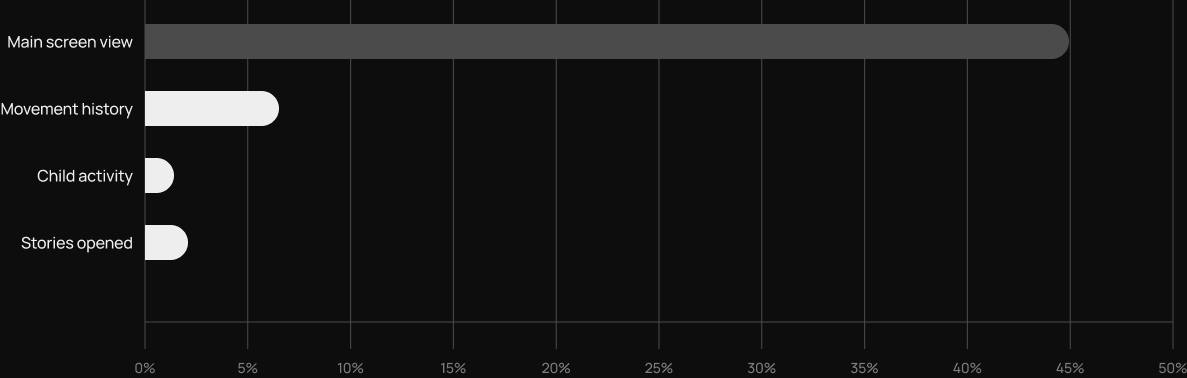
The analyst's session data showed one dominant pattern: open the app, look at the map, close it. 45.2% of sessions were a main-screen view and nothing else.
Meanwhile the feature most associated with users staying — a day-by-day movement history of the child — appeared in only 6.4% of sessions.
Two more signals pointed the same way
— The prime slot at the top of the content area was a stories carousel. 2.4% of people who reached the main screen opened it;
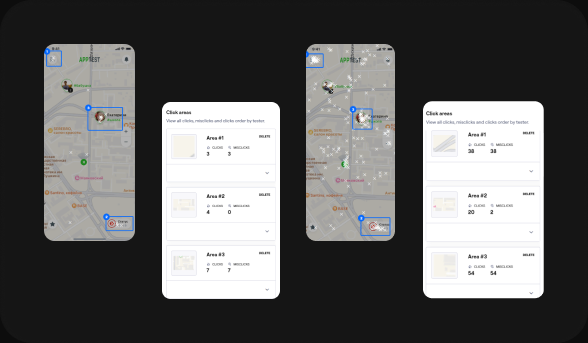
— In an earlier usability round, participants looking for child-related settings kept tapping the child’s marker on the map — 54 taps, 7 of them first taps. Their mental model already pointed at the child, not at the menu.
So the features that drove retention already existed, already worked, and sat three taps behind a screen most people never scrolled. The problem wasn’t missing functionality — it was distance.
Decisions
Zero taps, not fewer taps
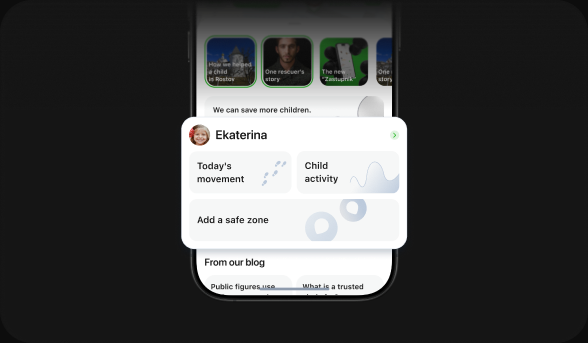
The research had already answered where people look: at the child. Instead of adding a navigation entry or shortening a path, I removed the path — a card per child directly on the main screen, holding the previously buried features: movement history, child activity, safety zones.
Thumb zone over visual prominence
The card sits in the lower portion of the scroll area, inside comfortable one-handed reach. Placing it higher would have won prominence and lost reachability — for an app people open while walking or driving, reach won.
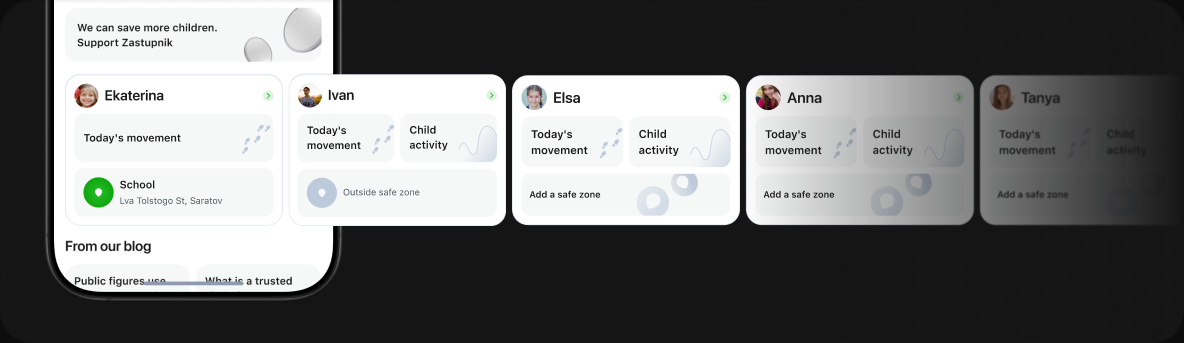
— Multiple children → horizontal carousel of cards, one per child, no "primary" child;
— Child on iOS → activity tile absent;
— Child outside a safe zone → the card surfaces that status directly;
— No safety zones set → the tile becomes a CTA to create one instead of rendering empty;
The stories trade-off: keep the slot, earn the attention
The card sits in the lower portion of the scroll area, inside comfortable one-handed reach. Placing it higher would have won prominence and lost reachability — for an app people open while walking or driving, reach won.
So I treated it as a trade-off to balance rather than a conflict to win. The child card went below the carousel instead of replacing it — parents get the features they came for, partners keep their placement.
Then I went after the other side: making the slot worth opening. Instead of static promotional cards, the carousel now carries content about the parent's own child — a weekly screen-time report delivered every Monday, comparing last week against the one before, and interactive polls.
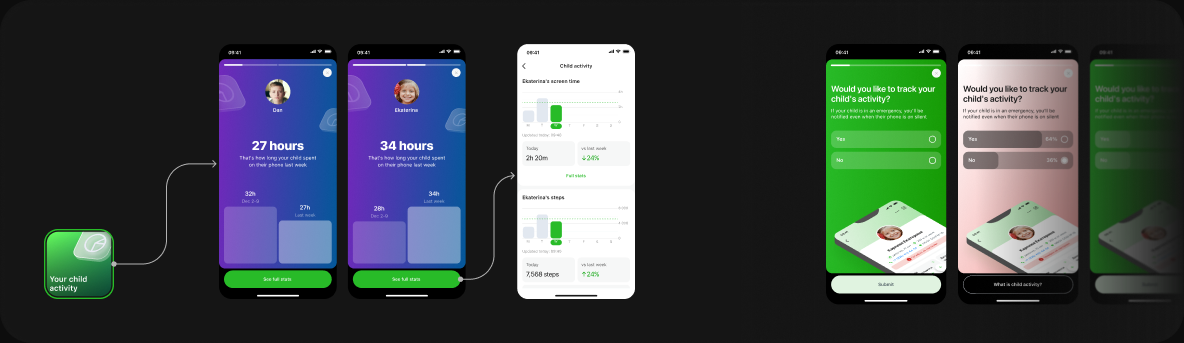
The bet
A story about your child gets opened, a story about a partner doesn't. Raise the reason to open the carousel, and the partner content sharing that slot gets seen along with it. Rather than choosing between user value and business value, the design makes one carry the other.
This shipped, but story engagement hasn't been measured against the old carousel yet — so the bet is still a bet.
Result
After release, in iOS sessions
— Movement history: ~8% → ~14%;
— Child activity: ~1% → ~4%
Measured as feature occurrence in iOS sessions, weekly, in the first weeks after release. This was a before/after observation, not a controlled experiment.
Approximate values read from the design curves; not source analytics. Hover, tap or focus a week to inspect.
Retention isn’t claimed here: the baseline month was an outlier, and the team’s analytics treated the question as open.
Reflection
The card works, but it still sits below two blocks of promotional content. I never tested the version where it comes first — and given that the business case for the stories was real, that trade-off deserved an experiment rather than a design review. If I ran this again, I'd push for a test on ordering.
The broader lesson: the fix wasn't new functionality. It was noticing that a retention driver had already shipped, already worked, and simply wasn't visible. Before designing something new, check what's already there and buried.